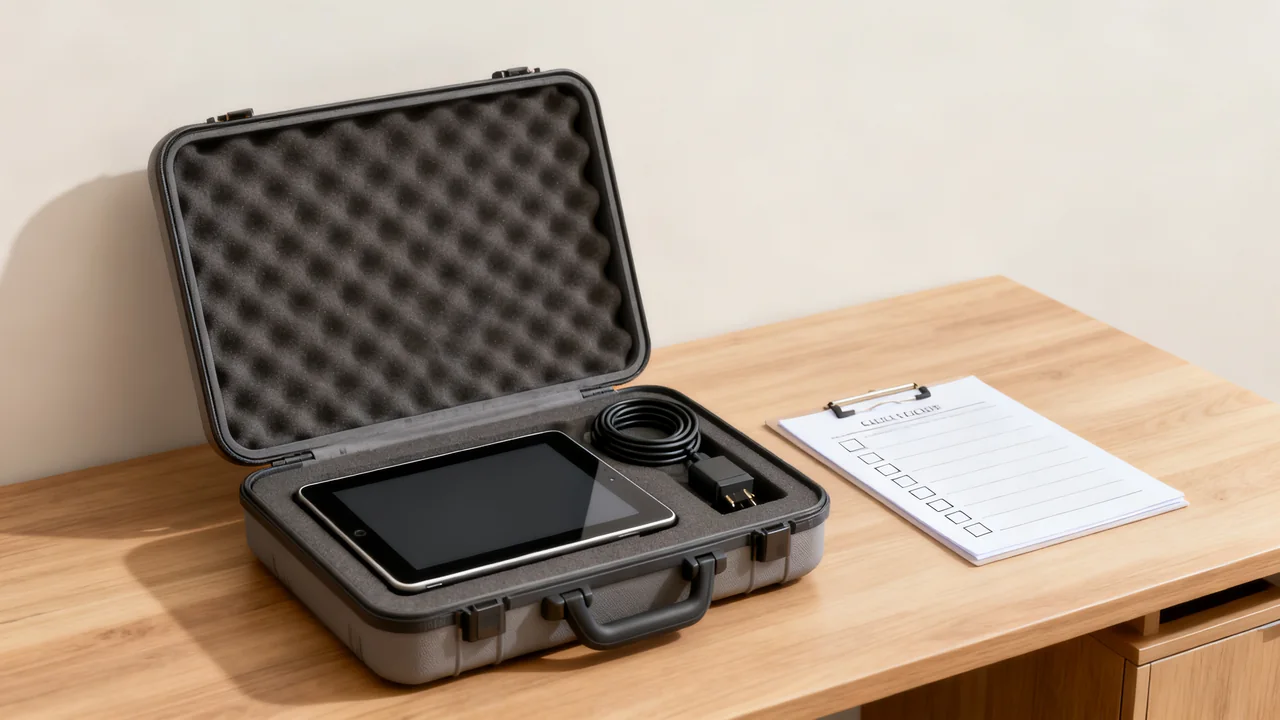
Shared device loan kits fill gaps when team members need temporary tech for off-site visits, business travel, or while their primary device is being repaired. Unlike general office supply storage or one-off equipment spares, these kits are pre-assembled, self-contained, and designed for fast checkout and return, reducing downtime for employees and administrative work for operations teams. This guide covers building a kit tailored to your team’s specific use cases, tracking assets without complex software, and keeping the kit functional over time.
First, Map Use Cases to Set Kit Contents
Before purchasing any items, list the most common scenarios where employees need temporary devices, to avoid buying equipment that will sit unused. Common use cases include: 1) day trips to client sites where a team member needs a portable presentation device, 2) week-long work travel where their personal laptop may not be approved for company data access, 3) short-term replacements when an employee’s primary laptop is being serviced, 4) contract worker or short-term intern use for 1-3 day projects, and 5) off-site team meetings where multiple people need portable scanners or hotspots to share data.
For each use case, note the minimum required functionality, not the highest available specs. For example, a laptop for client presentations only needs to run presentation software and connect to external displays, not high-powered design tools. Prioritize devices that are compatible with your existing company systems, to avoid setup delays when someone checks out the kit. All compatibility checks should follow your internal IT team’s guidelines and device manufacturer specifications.
Core Kit Components to Include (and Skip)
Build a kit around one confirmed use case rather than a generic bundle for a particular team size. A presentation kit might contain an approved laptop, its charger, and the verified display connection. A temporary replacement laptop may need different software and access. A travel kit may have separate connectivity needs.
List every required component and check it with the actual devices. Connector shape alone does not establish charging power, video output, or data capability. A power bank described in milliamp-hours is not automatically suitable for a laptop; verify the required output, charging method, and any applicable travel or carrier rules for the specific product and journey.
Include protective packing and only the accessories needed for the defined task. Keep a clear list of what the kit does and does not support. Specialist equipment can remain separately bookable if that makes preparation and tracking easier.
Illustrative Example: Kit Build for a 12-Person Marketing Agency
In a hypothetical agency, most loan requests concern client presentations. The operations lead works with IT to prepare one approved laptop, its matching charger, a mouse, and the display accessories verified for the expected venues. The kit includes a component list and a support contact.
Before collection, the borrower confirms login access and tries the presentation workflow. If a venue needs different connectivity, that requirement is checked before departure rather than assuming the kit has a universal adapter. A separate process handles internet connectivity and any permitted travel batteries.
The case is selected after measuring and packing the actual items. The team records checkout demand and missing components so it can decide whether another kit or different accessories are justified. No price, case capacity, success rate, or trial result is implied by this fictional example.
Storage Layout for Fast Checkout and Return
Store the loan kit in a fixed, easily accessible location that is not mixed with general office supplies or spare equipment, to avoid employees removing items without checking them out. A dedicated locked cabinet drawer or a labeled shelf in the operations storage area works well, as long as the location is communicated to all team members. Inside the storage space, choose a suitable protective case or cases for the actual load, so employees can grab the full case and go without hunting for individual items. If you have multiple kits for different use cases (e.g., a travel-only kit and a repair replacement kit), use separate color-coded cases to avoid confusion.
Line the inside of the case with custom cut foam inserts or labeled elastic loops for each item, so missing components are immediately visible when the kit is returned. Label each item with a permanent, tamper-resistant tag that includes the kit name and item number (e.g., “Loan Kit 1, Item 3: Hotspot A”) to make inventory checks fast. Keep a single laminated checkout sheet in a pocket on the outside of the case, so employees can fill out their name, checkout date, expected return date, and signature before taking the kit. Do not store the kit in a high-traffic common area, as this increases the risk of items being removed for casual use and not returned.
Tracking and Inventory System Without Specialized Software
You do not need expensive asset management software to track the loan kit; a controlled spreadsheet or paper log may be sufficient if it supports the actual workflow. The log should include the following fields for each checkout: employee name, date of checkout, expected return date, name of staff member who approved the checkout, notes on any existing damage to the kit at checkout, date of return, and signature of the staff member who inspected the kit on return. For teams with hybrid work arrangements, you can use a shared form to submit checkout requests, with automatic notifications sent to the operations lead for approval.
Check the component list and condition at checkout and return, and schedule readiness checks appropriate to how often the kit is used. Mark missing or faulty items clearly so the kit is not represented as ready. Follow the device maker’s storage and charging guidance and prepare batteries before deployment; repeated full charging during storage is not a universal rule.
Decision Table: Common Loan Kit Policy Choices
The table below outlines tradeoffs for three common loan kit policy decisions, to help you choose rules that fit your team’s workflow:
| Decision Point | Flexible Policy | Structured Policy | Best For |
|---|---|---|---|
| Checkout approval required? | No approval needed; employees log use in the checkout sheet | Operations lead approval required for all checkouts | Flexible for small teams with low kit use; structured for teams with frequent checkout requests or high-cost kit items |
| Maximum checkout duration | No set limit; employees note expected return date | An agreed return date based on the booking and other confirmed demand | Flexible for teams with rare use; structured for teams where multiple people may need the kit in the same week |
| Allowed use cases | Approved work-related use under the organization’s policy | Only pre-defined use cases (client visits, travel, device repairs) | Flexible for teams with low turnover; structured for teams with many short-term contract workers |
Maintenance and Replacement Protocols
Assign a custodian to keep devices ready under the organization’s IT process. Check required software, updates, account access, and device functions before issue. Isolate damaged equipment and arrange authorized service where appropriate instead of leaving it in the available kit.
At return, handle user files, signed-in accounts, and any data-bearing media according to the organization’s data and access policy before reissuing the device. Do not give every borrower access to a previous user’s profile or saved credentials.
Replace equipment based on condition, support status, compatibility, repair options, and the work it must perform. There is no universal replacement age for laptops, hotspots, projectors, scanners, or power banks. Record the reason for replacement and follow the approved data-removal and disposal process.
Actionable Pre-Checkout Checklist for Staff
Provide this short checklist to employees before they take the loan kit, to reduce returns of missing or damaged items:
- Confirm all items listed on the kit’s component sheet are present in the case before leaving the office
- Note any existing scratches, dents, or functional issues on the checkout sheet before taking the kit
- Verify you have login access to any pre-configured device profiles before leaving the office
- Keep the kit in its hard case when not in use, to avoid damage during transport
- Do not install unapproved software on loaned devices, per your company’s IT policy
- Return all items to their designated slots in the case when returning, to speed up inventory checks
Tradeoffs for Expanding the Kit
Expand from observed scheduling conflicts or repeated confirmed needs, not headcount alone. Another laptop may solve simultaneous bookings, while extra display accessories may solve a narrower compatibility issue. Check which problem is occurring before buying.
If individual components can be borrowed, give each an identifier and track it separately. Keep the master component list accurate and mark the full kit unavailable when a missing component prevents its intended use. Separate kits by purpose where that makes availability and preparation clearer.
Have a question or a correction?
Contact the editorial team